Projects
Group work by client or initiative, so every entry lands in the right place from the start.
Daily Report Generator keeps your work organized by project: log what you did, attach the screenshots that prove it, and turn a week of entries into a clean PDF report — in a few clicks.
Windows 10/11 · Live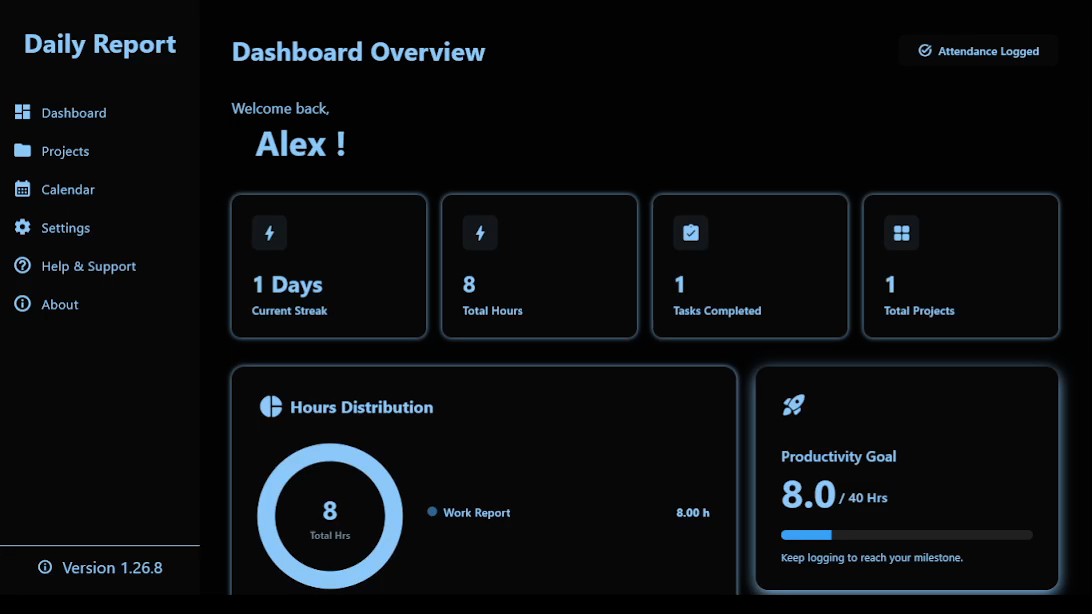
Six focused modules, all working off the same log of daily entries.
Group work by client or initiative, so every entry lands in the right place from the start.
Record what you worked on as you go — short entries tied to a project, a date, and a time.
Compile a range of logs into one structured report, organized by project and date.
Drop in screenshots or reference images next to any entry, so context travels with the work.
Jump to any date to see, edit, or add entries — a visual map of everything you've logged.
Generate a clean, professional PDF from any report — ready to send without reformatting.
The same three steps, whether you're closing out a single day or a whole month.
Add an entry per project as you finish a task — attach an image if it helps explain the work.
Pick a date range and a project, and Daily Report pulls the matching entries into one place.
Export a formatted PDF report, ready to share with a client, manager, or your own records.
Daily Report is a small, focused desktop tool — no accounts, no clutter, just your work, organized.
Everything you need to manage projects, daily logs, reports, and your work calendar — in one simple desktop app.
The Windows installer is being prepared. In the meantime, you can install Daily Report from the Microsoft Store.
Prefer the Microsoft Store? Install Daily Report there and receive updates automatically.
Get it from Microsoft StoreYour data stays on your device.
Open the app and start working.
Turn reports into polished PDFs.
Add images to any entry.
Questions about how Daily Report works, a bug to report, or a feature you'd like to see — this is the place.
Reach out directly — every message is read by the person building the app.
Yes, Daily Report Generator is free to use for personal and internal business purposes.
Daily Report Generator currently targets Windows 10 and 11. There's no macOS or Linux build planned for the initial release.
Projects, logs, and attachments are stored locally on your device. Daily Report doesn't require an account or an internet connection to work.
Yes — each log entry can hold multiple image attachments, which are included when you export a report to PDF.
Yes — reports can be built from any range of dates and filtered by project before exporting to PDF.
Email sohamarts.support@gmail.com with a short description of what happened — screenshots help a lot.
Privacy policy, disclaimer, licensing, and terms for Daily Report and this website.
Daily Report Generator ("Daily Report Generator", "the App", "we", "us", or "our") respects your privacy. This Privacy Policy explains how information is handled when you use the Daily Report Generator desktop application.
Daily Report Generator is designed primarily as a local productivity and record-keeping application. The current version does not require you to create an account or submit your reports to a cloud service operated by us.
By using Daily Report Generator, you acknowledge the practices described in this Privacy Policy.
Depending on how you use Daily Report Generator, the application may store information that you enter or select, including:
You should avoid entering sensitive personal information into reports unless it is necessary for your intended use of the application.
The current version of Daily Report Generator is designed to store your application data locally on your device.
Your projects, reports, settings, and locally referenced files may therefore be stored in files or application storage on your computer.
Daily Report Generator does not currently require an online account to use the core application.
The current version of Daily Report Generator does not provide a cloud storage service operated by us for your reports, projects, images, or other application data.
Data created within the application is primarily stored locally on your device.
If you choose to use another service or application to send, share, back up, synchronize, or otherwise transfer your data, that service may process your information according to its own privacy policy and terms.
We do not sell, rent, or trade your personal information to third parties.
We do not use your report content for advertising purposes.
Your locally stored report information is not collected by us merely because you use the application.
The current version of Daily Report Generator does not require a cloud account or online server operated by us to store your reports.
If future versions introduce online features, such as cloud synchronization, accounts, analytics, crash reporting, online backup, or other network services, this Privacy Policy may be updated to explain what information is collected, how it is used, and how those services operate.
Daily Report Generator may allow you to select images or other files from your device for use in your reports.
These files are selected by you and are used for the purpose you request, such as displaying or generating a report.
Daily Report Generator does not claim ownership of the images, documents, or other content that you add to the application.
You are responsible for ensuring that you have the necessary rights or permissions to use any third-party content you add to your reports.
Because your data may be stored locally on your device, you are responsible for maintaining appropriate backups of important reports and files.
Deleting application data, uninstalling the application, formatting your device, experiencing hardware failure, or otherwise losing access to your storage may result in loss of locally stored information.
We strongly recommend keeping backups of important reports and files.
We take reasonable steps in designing Daily Report Generator to avoid unnecessary collection of personal information.
However, no software or computer storage system can be guaranteed to be completely secure.
You are responsible for maintaining appropriate security on your device, including operating-system security, user accounts, passwords, antivirus protection, and backups where appropriate.
Daily Report Generator is a general productivity application and is not specifically directed toward children.
We do not knowingly collect personal information from children through an online service.
Because the current version primarily stores information locally on the user's device, information entered into the application is generally stored on and controlled through that device rather than being transmitted to a cloud service operated by us.
Daily Report Generator may use third-party open-source libraries and software components.
These components are used to provide application functionality and remain subject to their respective licenses.
Information about third-party licenses can be viewed in the Third-Party Licenses section of the application.
Daily Report Generator may be updated from time to time.
Future versions may introduce new functionality that changes how information is handled. If a material change affects our privacy practices, this Privacy Policy may be updated accordingly.
The "Last Updated" date at the top of this document indicates when the policy was most recently revised.
Depending on applicable law and your circumstances, you may have rights regarding personal information associated with you, including rights relating to access, correction, deletion, withdrawal of consent, or complaints.
Because the current version of Daily Report Generator primarily stores information locally on your device and does not require you to submit your report data to a cloud service operated by us, you can generally manage or delete locally stored information directly through the application or your device.
If you believe we have received or processed personal information relating to you and you have a privacy-related question or request, you may contact us using the contact information provided below.
For privacy questions, concerns, or requests, contact:
Developer / Publisher:
SohamArts
Email:
sohamarts.support@gmail.com
This Privacy Policy shall be interpreted in accordance with applicable laws and regulations.
To the extent permitted by applicable law, matters relating to this Privacy Policy and the use of Daily Report shall be subject to the laws of India.
Nothing in this section is intended to limit any mandatory rights or protections available to you under applicable law.
By using Daily Report Generator, you acknowledge that you have read and understood this Privacy Policy.
Daily Report Generator is a productivity and record-keeping application intended to help users create, organize, manage, and generate daily reports and related project information.
The information contained in reports is entered or provided by the user. Daily Report Generator does not independently verify, validate, or guarantee the accuracy, completeness, reliability, or suitability of user-generated information.
Users are responsible for reviewing their reports and ensuring that the information they contain is accurate and appropriate before using, submitting, sharing, printing, exporting, or relying upon them.
Daily Report Generator is a general productivity tool and is not intended to provide legal, financial, medical, professional, accounting, technical, or other specialized advice.
The application should not be relied upon as a substitute for advice or services from a qualified professional where professional advice is required.
The developer does not guarantee that Daily Report Generator will operate without errors, interruptions, defects, data loss, data corruption, security issues, or compatibility problems on every device, operating system, hardware configuration, or software environment.
Because the current version of Daily Report Generator primarily stores application information locally on the user's device, users are responsible for maintaining appropriate backups of important reports, files, images, and other application data.
Users are also responsible for maintaining the security of their own devices and storage systems.
Daily Report Generator does not claim ownership of content created or provided by users. Users remain responsible for the content they create, store, import, export, share, or otherwise use through the application.
To the maximum extent permitted by applicable law, the developer or publisher is not responsible for losses, damages, data loss, business interruption, loss of profits, or other consequences resulting from the use of, inability to use, or reliance upon the application or information created using it.
Nothing in this Disclaimer excludes, limits, or restricts any liability, right, or protection that cannot legally be excluded, limited, or restricted under applicable law.
This Disclaimer should be read together with the Daily Report Generator Terms of Use, Privacy Policy, Proprietary License, and applicable Third-Party Licenses.
Developer / Publisher:
SohamArts
Email:
sohamarts.support@gmail.com
Copyright © 2026 SohamArts. All rights reserved.
Subject to this Proprietary Software License and the applicable Daily Report Generator Terms of Use, SohamArts grants you a limited, non-exclusive, non-transferable, revocable license to install and use the compiled version of Daily Report Generator for its intended purpose.
This license grants you the right to use the software. It does not transfer ownership of the software or any intellectual-property rights to you.
This license applies only to the original Daily Report Generator software and materials owned or controlled by SohamArts and does not replace or restrict rights granted under applicable third-party or open-source licenses.
Daily Report Generator and its original:
are owned by or licensed to SohamArts and are protected by applicable intellectual-property laws.
Except for third-party components and content provided by users, all rights, title, and interest in the original Daily Report Generator software and materials remain with SohamArts or the applicable rights holder.
Except where expressly permitted by this license or applicable law, you may not:
Nothing in this section is intended to restrict rights that cannot legally be restricted under applicable law or rights expressly granted by an applicable third-party or open-source license.
You may install and use the application on devices for which you have appropriate authorization.
The application may be used for personal, educational, professional, or internal business productivity purposes, provided that such use complies with this license and the applicable Terms of Use.
If a particular distribution, purchase agreement, or other written agreement grants additional rights, those rights apply to the extent specified in that agreement.
Daily Report Generator may include third-party and open-source libraries, frameworks, packages, and other components.
Those components are not necessarily covered by this proprietary license and remain subject to their respective copyright notices, licenses, and terms.
Nothing in this license is intended to remove, restrict, or override rights granted by an applicable third-party or open-source license.
Third-party copyright and license notices may be available through the application's Third-Party Licenses section.
This license does not grant SohamArts ownership of content created or provided by users through Daily Report.
Users retain ownership of their own reports, project information, text, images, files, and other content, subject to any rights belonging to third parties.
Users are responsible for ensuring that they have the necessary rights and permissions for content they add to the application.
Installing, downloading, purchasing, or otherwise obtaining a copy of Daily Report Generator does not give you ownership of the software, source code, trademarks, branding, or other intellectual property belonging to SohamArts.
The license granted under this document is a license to use the software and is not a sale or transfer of ownership.
This license remains effective until terminated.
It may terminate automatically if you materially violate the terms of this license, the applicable Terms of Use, or other applicable licensing conditions, to the extent permitted by applicable law.
Upon termination, you must stop using the software and stop distributing any unauthorized copies of the software.
Termination does not affect any rights or obligations that, by their nature, are intended to continue after termination.
Daily Report Generator is provided subject to the disclaimers, warranties, and limitations of liability contained in the applicable Terms of Use.
Nothing in this license creates any additional warranty or guarantee regarding the software.
To the maximum extent permitted by applicable law, the software is provided on an "as is" and "as available" basis.
All rights not expressly granted by this license are reserved by SohamArts or the applicable rights holder.
No rights are granted by implication, estoppel, or otherwise beyond those expressly stated in this license.
This Proprietary Software License should be read together with the Daily Report Generator Terms of Use, Privacy Policy, Disclaimer, and applicable Third-Party Licenses.
Where a third-party or open-source license grants rights that differ from this proprietary license, the applicable third-party or open-source license governs the corresponding third-party component.
Where applicable law provides rights that cannot legally be restricted by this license, those rights remain unaffected.
Copyright © 2026 SohamArts. All rights reserved.
These Terms of Use ("Terms") govern your use of the Daily Report Generator desktop application ("Daily Report Generator", "the App", "we", "us", or "our").
By installing, accessing, or using Daily Report Generator, you agree to these Terms.
If you do not agree with these Terms, you should not install, access, or use the application.
Daily Report Generator is a productivity application designed to help users create, organize, manage, and generate daily reports and related project information.
The application is provided for general productivity and record-keeping purposes.
Subject to these Terms and the applicable Proprietary License for Daily Report Generator, you are granted a limited, non-exclusive, non-transferable, revocable license to install and use Daily Report for its intended purpose.
This license permits you to use the application but does not transfer ownership of the software or any intellectual-property rights to you.
All rights not expressly granted to you remain with the developer or publisher.
The separate Daily Report Generator Proprietary License and any applicable third-party licenses form part of the licensing terms governing the use of the application.
You agree to use Daily Report Generator only for lawful purposes.
You must not:
Nothing in these Terms is intended to restrict rights that cannot legally be restricted.
You retain ownership of the content that you create or add to Daily Report, including:
You are responsible for the content you enter into the application.
You are also responsible for ensuring that your content does not violate the rights of another person or organization.
Daily Report Generator does not claim ownership of your content solely because you create, store, or use that content within the application.
Daily Report Generator provides tools for creating and organizing reports.
The application does not independently verify the accuracy, completeness, or reliability of information entered by you.
You are responsible for reviewing reports before using, sharing, printing, exporting, submitting, or relying on them.
Daily Report Generator should not be treated as a substitute for your own review or verification of information.
Because the current version may store your information locally on your device, you are responsible for maintaining appropriate backups of important data.
We are not responsible for loss, corruption, alteration, or inability to access locally stored information caused by:
You should maintain independent backups of important reports, files, and other information.
We may release updates, improvements, bug fixes, security updates, or other changes to Daily Report Generator.
An update may:
We do not guarantee that every existing feature will remain unchanged in future versions.
We aim to keep Daily Report functional and reliable, but we do not guarantee that the application will always operate without errors, interruptions, bugs, defects, or compatibility issues.
Availability and functionality may also be affected by your device, operating system, hardware, third-party software, or other factors outside our reasonable control.
Daily Report Generator may contain third-party and open-source components.
Those components are subject to their own licenses, copyright notices, and terms.
Nothing in these Terms or the Daily Report Proprietary License overrides rights granted under an applicable third-party or open-source license.
Additional information about third-party components may be provided in the Third-Party Licenses section of the application.
Daily Report Generator, including its original software, source code, interface, design, branding, graphics, logos, documentation, and other original materials, is protected by applicable intellectual-property laws.
Except for content that you provide yourself and third-party components that are subject to their own licenses, these materials remain the property of the developer or publisher.
No ownership rights in the original Daily Report Generator software or materials are transferred to you through your use of the application.
To the maximum extent permitted by applicable law, Daily Report Generator is provided on an "as is" and "as available" basis.
We do not guarantee that:
To the maximum extent permitted by applicable law, the developer or publisher of Daily Report will not be liable for indirect, incidental, special, consequential, or similar damages arising from the use of, inability to use, or reliance upon the application.
This may include loss of data, loss of business, loss of profits, interruption of work, loss of files, or other losses.
Nothing in these Terms excludes, limits, or restricts liability that cannot legally be excluded, limited, or restricted under applicable law.
You may stop using Daily Report at any time by uninstalling or removing the application.
If you violate these Terms, the license granted to you may be terminated to the extent permitted by applicable law.
Upon termination of the license, you must stop using unauthorized copies of the software and comply with any applicable requirements of the Daily Report Generator Proprietary License.
Termination does not affect rights or obligations that by their nature are intended to continue after termination.
The current version of Daily Report Generator may be provided free of charge.
We may introduce paid features, premium editions, subscriptions, licenses, or other pricing models in future versions.
Any such features or purchases will be subject to the pricing, purchase terms, and applicable conditions presented at the time of purchase.
The availability of any particular feature is not guaranteed to remain unchanged in future versions.
We may update these Terms when the application, its features, services, licensing arrangements, or applicable legal requirements change.
The updated version will include a new "Last Updated" date.
Your continued use of Daily Report after updated Terms become effective may constitute acceptance of the updated Terms to the extent permitted by applicable law.
These Terms are intended to be governed by the applicable laws of India, subject to applicable legal requirements and jurisdiction.
Nothing in this section is intended to limit any mandatory rights or protections available to you under applicable law.
Developer / Publisher:
SohamArts
Email:
sohamarts.support@gmail.com
By installing, accessing, or using Daily Report Generator, you acknowledge that you have read, understood, and agreed to these Terms of Use.
Daily Report Generator is built using Flutter, Dart, and other third-party software libraries and packages.
We are grateful to the developers and open-source communities who make these tools available.
The third-party components included in or used by Daily Report Generator are distributed under their respective licenses. These licenses apply to the corresponding third-party components and are separate from the proprietary license covering the original Daily Report Generator software.
Daily Report Generator is built using the Flutter framework.
Flutter and its associated components are provided under their applicable open-source licenses. Flutter-related license and attribution information is included with the Flutter SDK and the distributed application where applicable.
Copyright: The Flutter Authors and contributors
Copyright © The Flutter Authors and contributors.
Redistribution and use in source and binary forms, with or without modification, are permitted provided that the following conditions are met:
THIS SOFTWARE IS PROVIDED BY THE COPYRIGHT HOLDERS AND CONTRIBUTORS "AS IS" AND ANY EXPRESS OR IMPLIED WARRANTIES ARE DISCLAIMED, INCLUDING, BUT NOT LIMITED TO, THE IMPLIED WARRANTIES OF MERCHANTABILITY AND FITNESS FOR A PARTICULAR PURPOSE. IN NO EVENT SHALL THE COPYRIGHT HOLDER OR CONTRIBUTORS BE LIABLE FOR ANY DIRECT, INDIRECT, INCIDENTAL, SPECIAL, EXEMPLARY, OR CONSEQUENTIAL DAMAGES ARISING IN ANY WAY OUT OF THE USE OF THIS SOFTWARE, EVEN IF ADVISED OF THE POSSIBILITY OF SUCH DAMAGE.
Daily Report Generator is developed using the Dart programming language.
The Dart SDK and associated components are distributed under their applicable open-source licenses, including the BSD 3-Clause License where applicable.
Copyright: The Dart Authors and contributors
Copyright © The Dart Authors and contributors.
Redistribution and use in source and binary forms, with or without modification, are permitted provided that the following conditions are met:
THIS SOFTWARE IS PROVIDED BY THE COPYRIGHT HOLDERS AND CONTRIBUTORS "AS IS" AND ANY EXPRESS OR IMPLIED WARRANTIES ARE DISCLAIMED, INCLUDING, BUT NOT LIMITED TO, THE IMPLIED WARRANTIES OF MERCHANTABILITY AND FITNESS FOR A PARTICULAR PURPOSE. IN NO EVENT SHALL THE COPYRIGHT HOLDER OR CONTRIBUTORS BE LIABLE FOR ANY DIRECT, INDIRECT, INCIDENTAL, SPECIAL, EXEMPLARY, OR CONSEQUENTIAL DAMAGES ARISING IN ANY WAY OUT OF THE USE OF THIS SOFTWARE, EVEN IF ADVISED OF THE POSSIBILITY OF SUCH DAMAGE.
Daily Report may use additional open-source packages available through the Dart and Flutter ecosystem.
Third-party packages used by Daily Report may include the following, depending on the specific build and platform:
cupertino_iconspath_providerpdfprintingimage_pickerurl_launchertable_calendarintlwindow_managershared_preferencesfile_pickerfile_selectorThe exact dependencies included in a particular version of Daily Report may vary depending on the application build, platform, and dependency versions.
Daily Report Generator does not claim ownership of third-party libraries, frameworks, packages, or other open-source components included in or used by the application.
The proprietary Daily Report Generator license applies only to the original Daily Report software and materials owned by the developer.
Third-party components remain subject to their respective copyright notices and licenses.
Nothing in the Daily Report Generator proprietary license is intended to remove, restrict, or override rights granted by an applicable open-source license.
Copyright and attribution notices belonging to third-party developers must remain intact where required by the applicable license.
Users and distributors must comply with the applicable license terms of each third-party component.
We thank the open-source developers and communities whose work contributes to the functionality of Daily Report.
The third-party components included in Daily Report Generator may have additional copyright notices, attribution requirements, and license terms.
Where required by their respective licenses, applicable copyright notices and license texts are included with the application or made available through the application's Third-Party Licenses section.
The exact third-party components and license information may vary between application versions and platforms.
Users should refer to the license and attribution information distributed with the corresponding version of Daily Report Generator for the applicable third-party notices and license terms.
The original software, source code, application interface, original designs, branding, graphics, documentation, and other original materials created for Daily Report remain protected by applicable intellectual-property laws and are governed by the Daily Report Proprietary License.
The proprietary license does not apply to third-party components that are distributed under their own licenses.
Where a third-party license grants rights that differ from the Daily Report Proprietary License, the applicable third-party license governs those third-party components.
Developer / Publisher:
SohamArts
Application:
Daily Report Generator
Version:
1.26.9